shadcn Alert Dialog
A modal dialog that interrupts the user with important content and expects a response. Preview it in Figma or edit it in DS Manager with your own tokens.
 Loading the Figma preview…
In the Figma kit
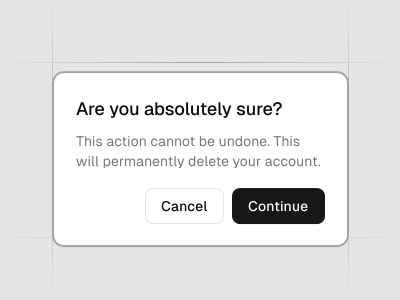
Trigger, overlay, header with title and description, and a footer with cancel and action buttons. The Figma component uses the same variant and size names as the React code, so the design maps directly to the component in your project.
Figma kitReact8 stylesLast updated 12 Mar 2026
Alert Dialog component for shadcn/ui in Figma
The Alert Dialog is a modal for critical decisions—like deleting data or leaving without saving. It locks focus, presents a clear message and offers primary/secondary actions to confirm or cancel.
Related components
FAQs
When should I use an alert dialog?
Use it only for high‑stakes actions that require explicit confirmation from the user.
What actions should it include?
Provide a clear primary action (Confirm/Delete) and a safe secondary action (Cancel).
How do I avoid accidental destructive actions?
Use descriptive button labels and consider requiring a short confirmation step for irreversible actions.
Is it accessible by keyboard?
Yes; traps focus within the dialog and returns focus to the trigger on close.